Journey: SNAP mid-certification material income change → recert nudge → notice
On this page
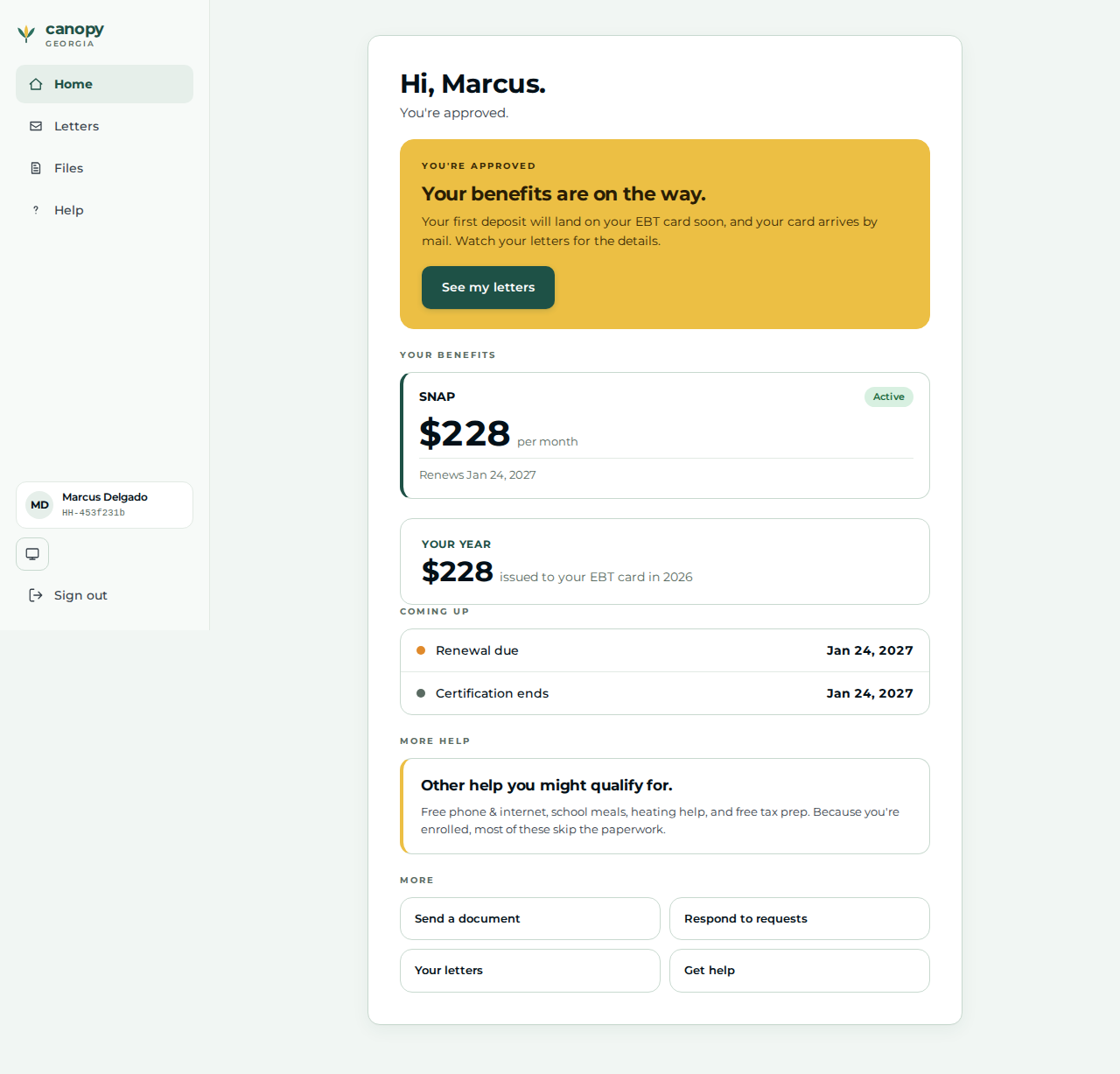
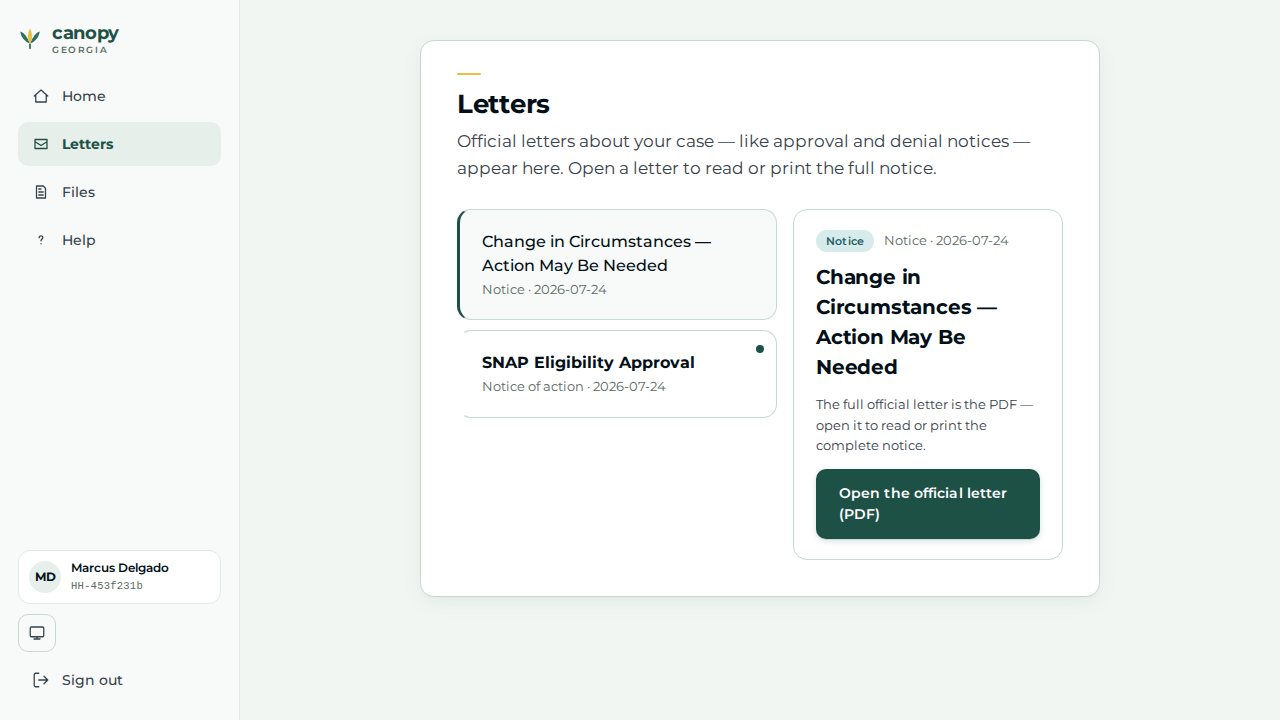
An applicant files a single-person SNAP application through the real applicant portal. A caseworker records the household’s wages, approves and certifies the case, then records a substantial mid-certification income increase the household reports. The renewals materiality subscriber runs a non-persisting dry-run against the determination of record, finds the change material (it would flip the verdict), and in ONE commit raises a recertification nudge and emits the event that generates the change-in-circumstances Notice of Action — the notice is a consequence of the material-change evaluation itself, not of anything the caseworker does next. The caseworker confirms the notice, then files the recert from the nudge (recording intent only). The applicant then signs back in and reads that letter — the report → act → notice → see-it arc that 7 CFR 273.12(a)(5)(v) bounds for simplified reporters, shown across BOTH portals side by side.
Reproducibility tier: Fully manual. Every step below can be reproduced live, by
hand, through the two served portals — the applicant files the case at /apply in
one browser and the caseworker works it at /cases in another. No harness,
given-library, or pre-seeded case is required; the case is the one the presenter
files during the demo.
This walkthrough is paired with the automated spec
tests/e2e/specs/journey-snap-income-materiality.spec.ts, covering scenario
snap.change.income-exceeds-130pct-mid-period. The screenshots below are captured
by that spec (worker shots step-NN-…, applicant shots app-NN-…). See
Verifying the journey to run it.
Personas & credentials
| Persona | Credentials / identity | Role in the journey |
|---|---|---|
Applicant |
Files at the portal |
Files the single-person SNAP application; later signs back in to read the change-in-circumstances letter. |
Caseworker |
Worker portal (:8080), Keycloak login |
Records the wages, approves + certifies the case, records the material income increase, confirms the notice it generates, and files the recert from the nudge. |
Bring-up & reset
cargo xtask dev start --profile full   # full devstack (SNAP + renewals + portal + notices)
cargo xtask seed --seed 42             # deterministic fixtures
Reset between runs so the demo starts from a clean slate:
cargo xtask migrate rollback # restore the pre-run DB snapshotUse a fresh browser (or an incognito window) per persona so the applicant’s
/lookup session and the caseworker’s Keycloak session do not collide. The
Demo Runbook owns the full side-by-side driving
detail.
Concrete precondition
The exact inputs this journey depends on (the #979/#991 bar — the applicant side is as reproducible as the worker side):
-
Applicant files (portal
/apply): a single-person household — head of household only, no other members.-
Head: first name
Marcus, last nameDelgado, date of birth1987-05-19. -
Safety question: Standard protections are fine; income step: No one works right now (the portal authors no income — the worker records it), quick-check amounts left at 0.
-
-
Caseworker records (worker portal):
-
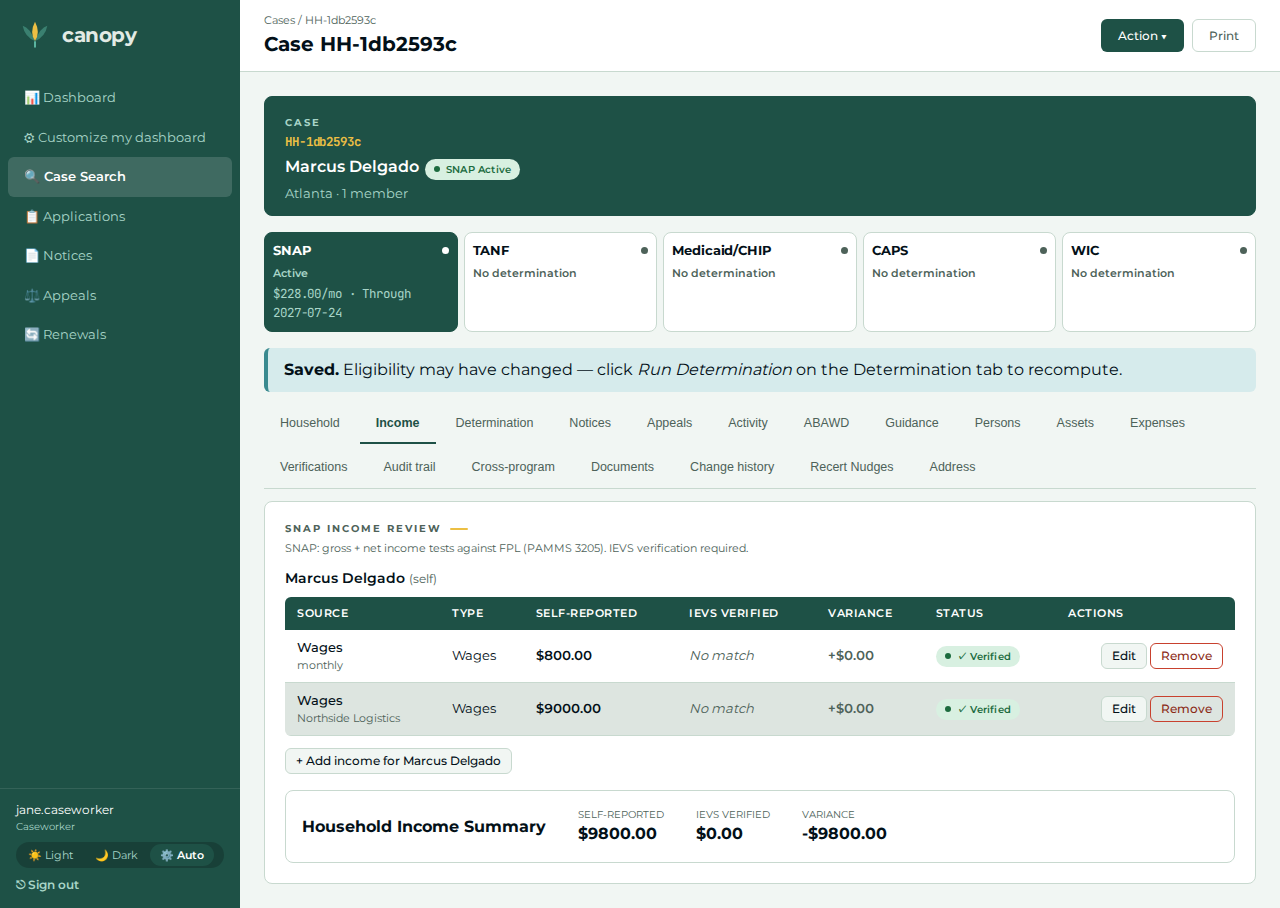
Baseline wages: income type wages, $800 / month, effective today — a construction extreme robustly below any gross-income limit (an input, not an asserted value).
-
Material increase: income type wages, $9,000 / month, effective today, employer
Northside Logistics— a construction extreme robustly above any gross-income limit, so the materiality dry-run flips the verdict. -
Certification period: start today, end twelve months ahead (a ~12-month window opening today).
-
The walkthrough, step by step
| # | Screen | Action | Expected | Screenshot |
|---|---|---|---|---|
01 |
Applicant |
At |
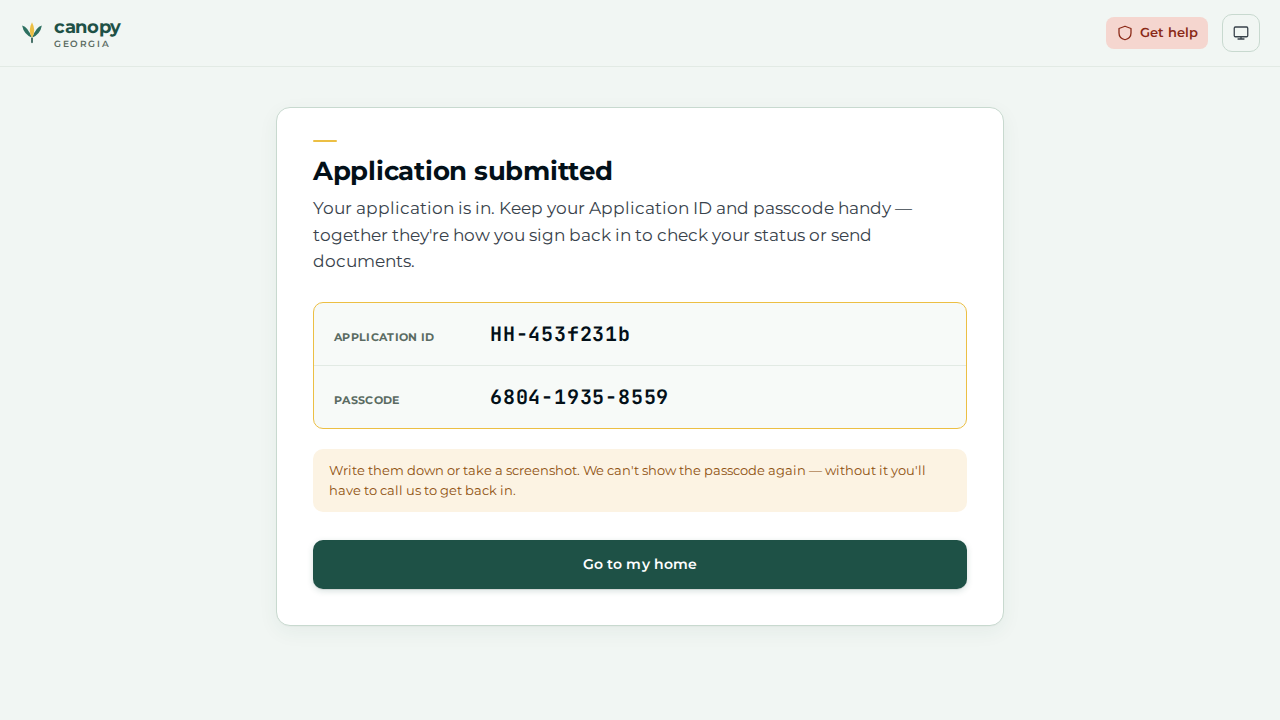
The Application submitted screen reveals the reference number ( |
|
02 |
Caseworker |
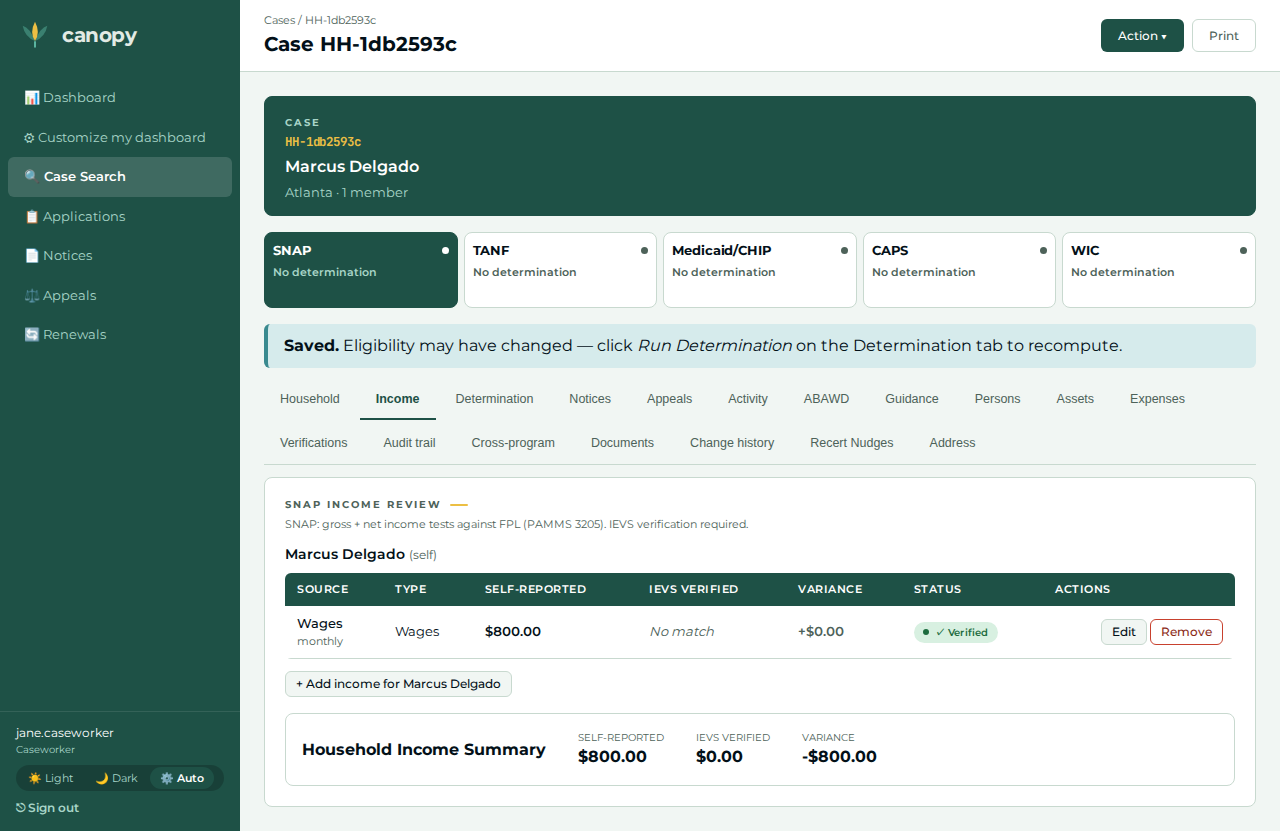
Open the case ( |
The wages row is recorded against the head — the portal-filed case had zero income, so this is the real income the determination will read. |
|
03 |
Caseworker |
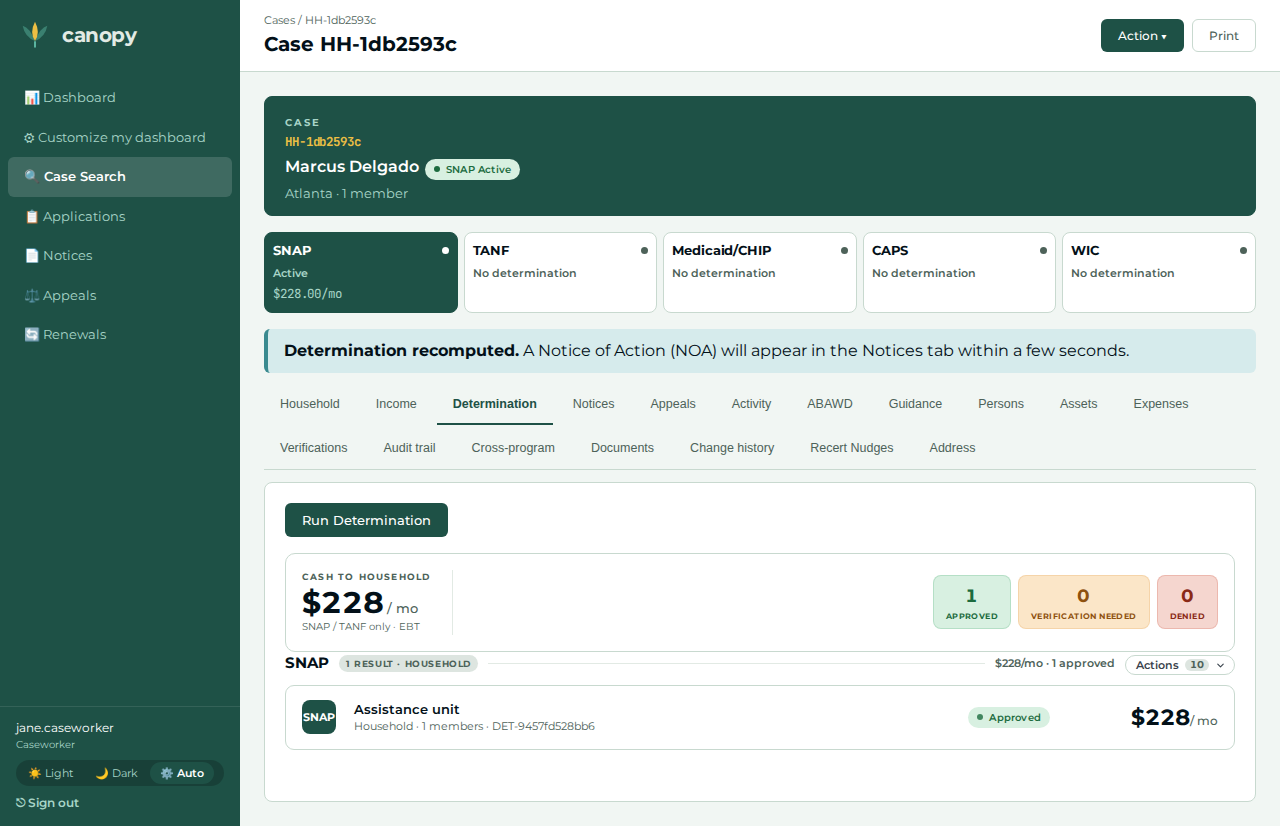
Determination tab → Action ▾ → Run Determination. |
The SNAP determination returns Approved with a monthly benefit — the eligible baseline the certification needs. |
|
04 |
Caseworker |
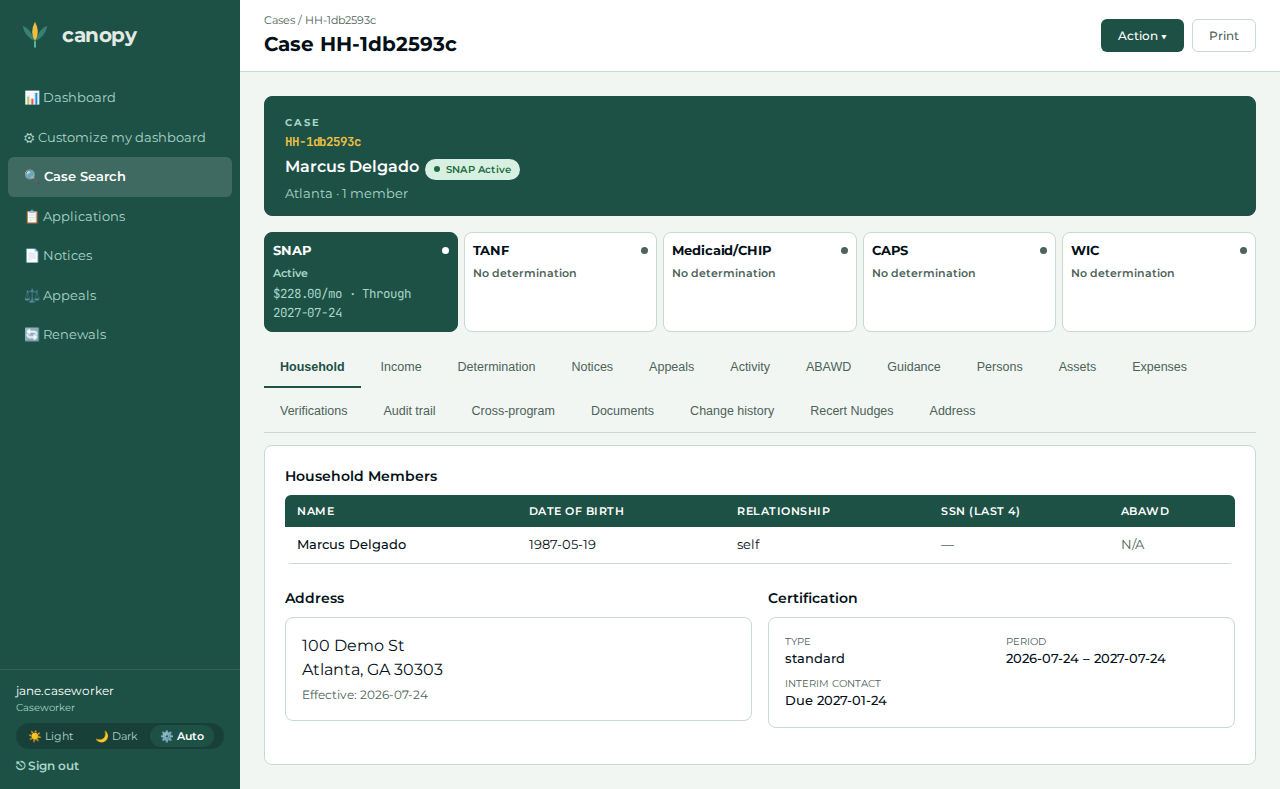
On the Determination tab, open the program group’s Actions panel → Create certification; enter start today and end twelve months ahead → Create certification. |
Redirects to the Household tab, whose Certification card now shows the period (start – end) and type — the household is now certified. |
|
05 |
Caseworker |
Income tab → + Add income for the head → income type wages, amount 9000,
frequency monthly, effective date today, employer |
The increased-wage row is recorded against the head (the same income-claim the determination reads). |
|
06 |
Caseworker |
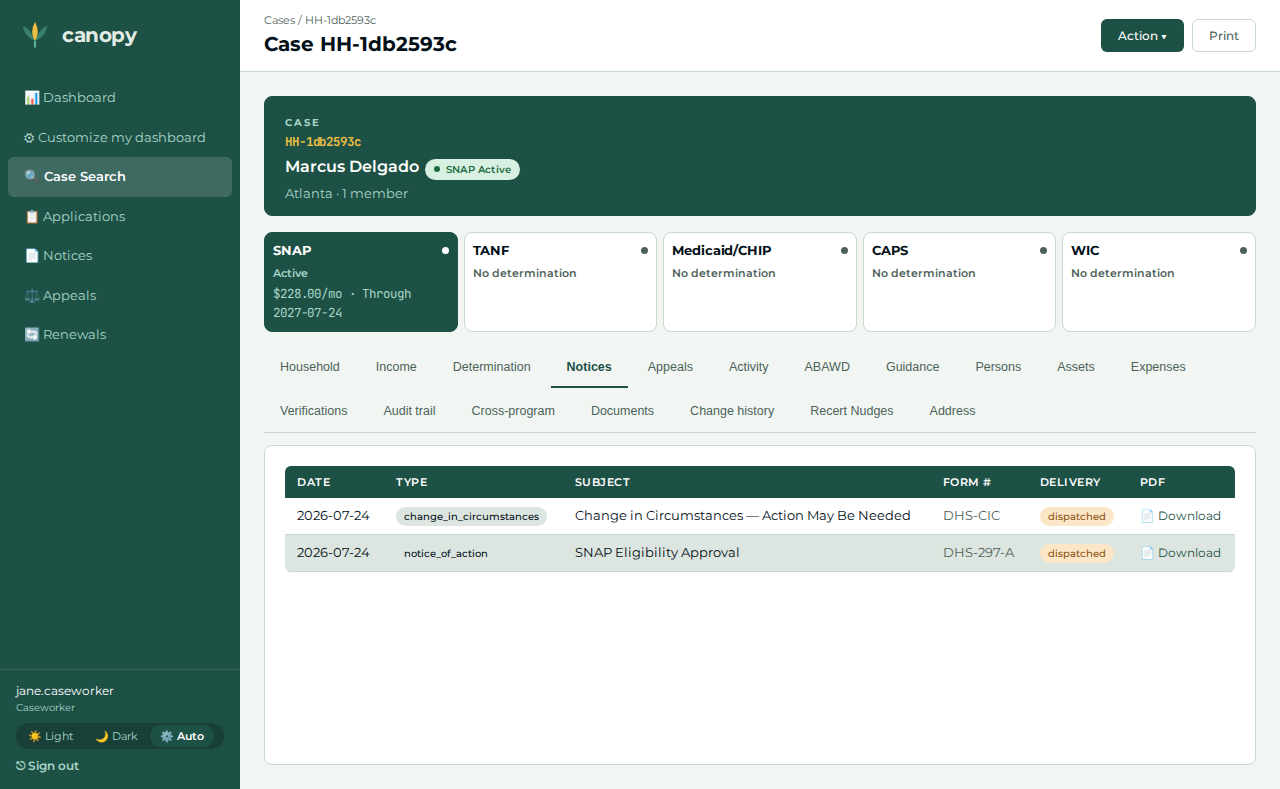
Open the Notices tab (the materiality subscriber runs shortly after the change; refresh if needed). |
A new notice row — the change-in-circumstances Notice of Action — appears beyond the pre-change baseline. It was generated by the material-change evaluation at step 05 (change → materiality dry-run → event → notice); no recert action has been taken yet. |
|
07 |
Caseworker |
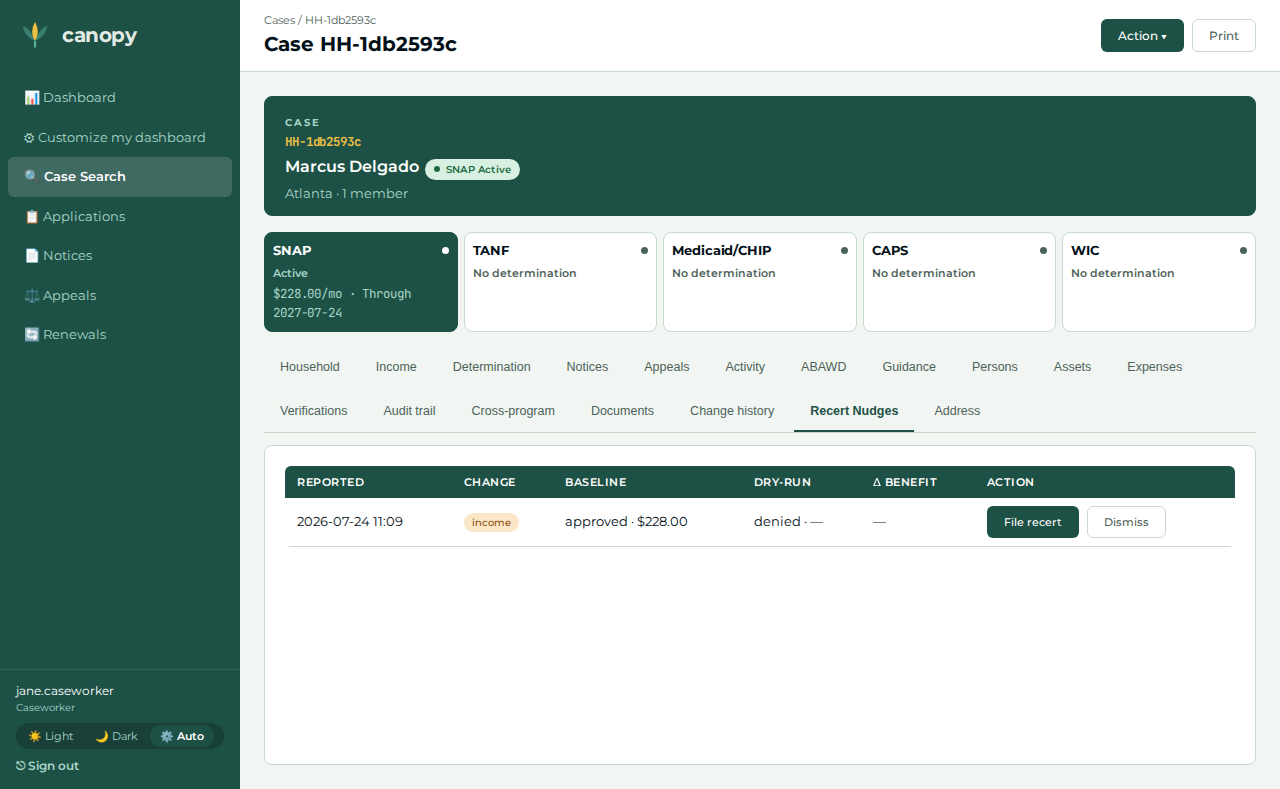
Open the Renewals tab. |
A pending recert nudge row appears — recorded by the SAME material-change evaluation that generated the notice. |
|
08 |
Caseworker |
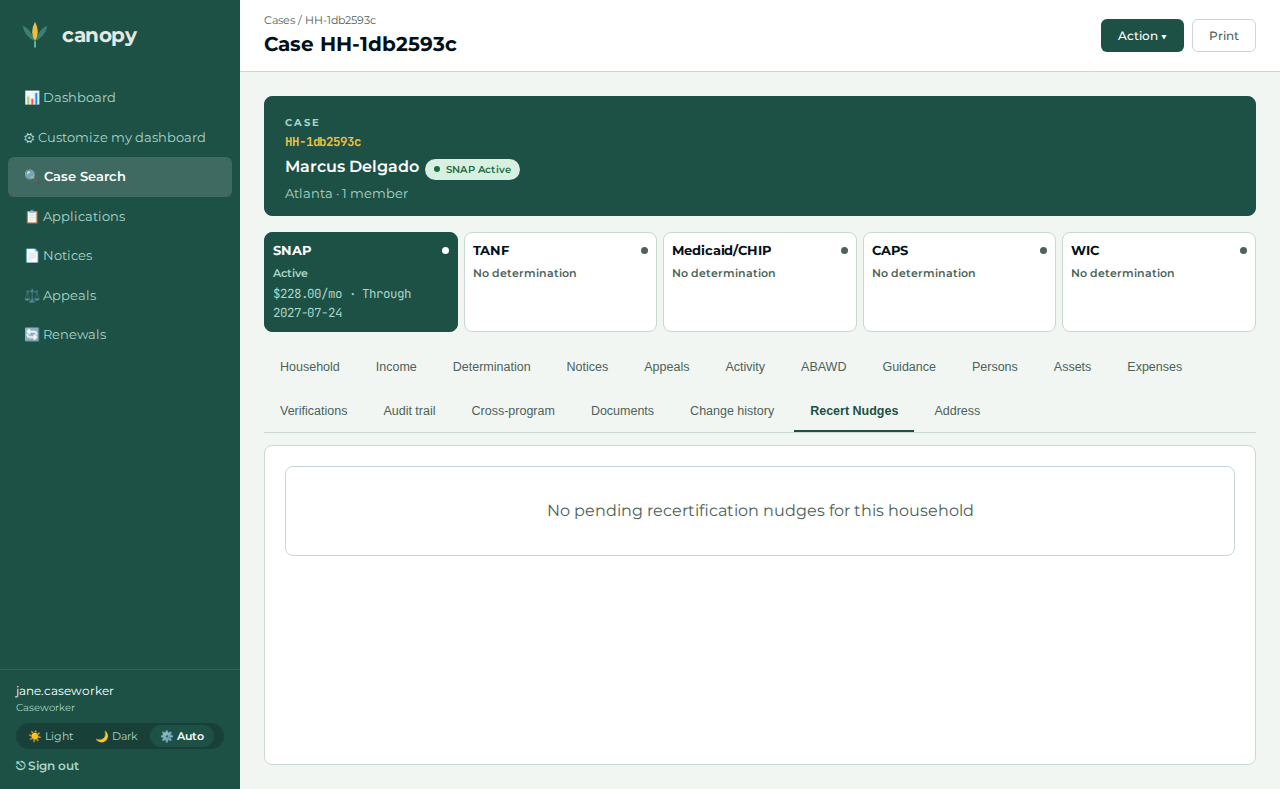
On the Renewals tab, click File recert on the nudge. |
Redirects back to the case; the filed nudge drops off the pending list — the decision was recorded end-to-end (BFF → renewals → DB stamp). Filing records the worker’s intent only; it generates no notice. |
|
09 |
Applicant |
Back in the applicant browser, go to |
Lands on the applicant Home with the returning-applicant greeting. |
|
10 |
Applicant |
Open the Letters page and click the most recent letter. |
The change-in-circumstances Notice of Action the caseworker generated is now visible to the applicant — the outcome reflected back across the portal boundary. |
|
Expected outcome / oracle
The oracle is relational / derived, never a dollar figure or a policy threshold:
-
The recorded income increase is a construction extreme — robustly over any gross-income limit — so the materiality subscriber’s non-persisting dry-run flips the verdict Approved → Denied. That flip is what makes the change material and raises the nudge; the amount is an input, not an asserted value.
-
A change-in-circumstances Notice of Action row appears on the Notices tab beyond the pre-change baseline — a notice-count increase, and it appears BEFORE any recert action is taken (the NOA pipeline fired end to end from the change alone: change → materiality subscriber → notice).
-
The recert nudge appears on the Renewals tab, then drops off the pending list after the caseworker files — a pure presence-then-absence relation.
-
That letter reflects back to the applicant — a non-empty subject appears on the applicant Letters page after they sign back in.
The baseline-wage and material-increase amounts are construction inputs (robustly inside / outside any gross-income limit), so the journey holds under any jurisdiction’s values.
Honest scope
-
Filing the recert records the worker’s intent only. The nudge is stamped
filed_recertand drops off pending; provisioning the follow-up recert application is a tracked concern, so the journey asserts the nudge is actioned, not a brand-new certification. -
The applicant portal captures identity + household composition only, never amounts, and drops the apply address at finalize. This journey has no address-dependent logic, so no address is authored; all income is recorded by the caseworker.
-
The spec’s notice oracle asserts a notice-count increase beyond a STABLE pre-change baseline — it waits for the approval determination’s own NOA to land before measuring, so the increase cannot be satisfied by that late-arriving letter — rather than matching a notice subject. In the live demo the new row is recognizable directly by its
change_in_circumstancestype chip. -
The negative leg — an immaterial ($1) income change raising no nudge — is a bounded-wait smoke check in the spec (a second in-file test, not a published demo beat); the exhaustive immaterial coverage lives at the materiality unit
proptest layer and the renewals pending-guard integration test.
Verifying the journey
cargo xtask e2e --devstack-profile full -- \
  specs/journey-snap-income-materiality.spec.ts --project journey
The spec files a single-person SNAP application through the real /apply wizard on
an unauthenticated portal context, then drives the worker steps above through the
portal BFF — recording the baseline wages, approving, opening the certification via
the Create certification action, recording the material income change, confirming
the change notice (asserted BEFORE any recert action, encoding the true causation),
then polling the renewals nudge and filing the recert — before signing the
applicant back in to read the letter. It captures the step screenshots
into test-results/e2e/walkthroughs/… for commit into
docs/modules/ROOT/assets/images/walkthroughs/…. A second in-file test is a
bounded-wait smoke check that an immaterial ($1) income change raises no nudge.