Journey: An upheld SNAP hearing turns continued benefits into an overpayment
On this page
A SNAP household files a SNAP application through the served applicant portal and is
approved. The caseworker then schedules a real adverse action — a termination of
the enrollment — and the household files a fair-hearing appeal bound to that
action, electing continued benefits under PAMMS Chart B2, so benefits continue
while the hearing is pending. The hearing upholds the agency. The benefit issued
during the continued-benefits window was therefore not owed, so it becomes an
overpayment: the appeals service assesses it asynchronously from the issued
benefits, an overpayment claim is auto-opened in the SNAP claim ledger, and the
7 CFR 273.18 demand notice lands on the worker Notices tab. This journey is a
side-by-side walk: the applicant files at /apply and later signs back in to view
the outcome, and the caseworker records the facts, schedules the termination,
files the action-bound appeal, issues the contested month under the stay, and
records the upheld decision — every write click-by-click in the worker portal, with
the calendar itself driven by the fleet’s logical test clocks.
Reproducibility tier: Worker-driven — and clock-driven. The applicant files the
case through the real portal and every scenario-driving fact and action (the wages,
the address, the determination, the enrollment, the scheduled termination, the
action-bound appeal, the contested issuance, the upheld decision) is performed by
the caseworker in the worker portal. But the contested arc requires the test-clock
devstack build (CANOPY_CARGO_FEATURES=canopy-api/test-clock): the whole
schedule→elect→issue→decide sequence plays out a couple of days into the next
logical month, and the decision is recorded after a further month has logically
passed — the fleet’s per-service clocks are advanced through the /test/clock
control surface, which only exists in that build. There is no way to walk this
journey on a production-shaped stack (the paired spec skips gracefully there); no
date is backdated by hand anywhere — backdating died with #1098.
This walkthrough is paired with the automated spec
tests/e2e/specs/journey-snap-upheld-decision-overpayment.spec.ts, covering scenario
snap.hearings.upheld-decision-claims-continued-benefits. The screenshots below are
captured by that spec. See Verifying the journey to run it.
Personas & credentials
| Persona | Credentials / identity | Role in the journey |
|---|---|---|
Applicant |
Files a SNAP application at the portal |
Files the SNAP application (head + one child) that is approved, paid under the stay, appealed, and then recouped from; signs back in at the end to view the approved Home. |
Caseworker |
Worker portal, Keycloak login |
Records the head’s wages + mailing address, runs the determination, ensures the live enrollment, schedules the termination, files the action-bound appeal with the continued-benefits election, issues the contested month, and records the upheld decision. |
Bring-up & reset
CANOPY_CARGO_FEATURES=canopy-api/test-clock \
  cargo xtask dev start --profile full   # full devstack (SNAP + applications + enrollment + appeals + notices + portal), test-clock build
cargo xtask seed --seed 42               # deterministic fixtures
# Reset between runs: roll the schema back (drops the run's rows), then use a fresh
# browser / incognito window so no applicant Redis session or WASM draft persists.
# Also reset the logical clocks (DELETE /test/clock on each service) — the offset
# is devstack-global and outlives the run.
cargo xtask migrate rollback
The Demo Runbook owns the full bring-up / reset detail (ports, health checks, troubleshooting); this is the minimum to run the journey.
Concrete precondition
The exact inputs this journey depends on — the applicant side is as reproducible as the worker side (#979/#991):
-
Applicant files at
/apply— head Alex Morgan, DOB 1985-06-15, phone 404-555-0100; one child Robin Morgan, DOB 2016-04-10, relationship child. Safety question: standard protections. Income step: "No one works right now" (the portal captures household composition + income categories only — never amounts), quick-check money fields left at 0, migrant No. -
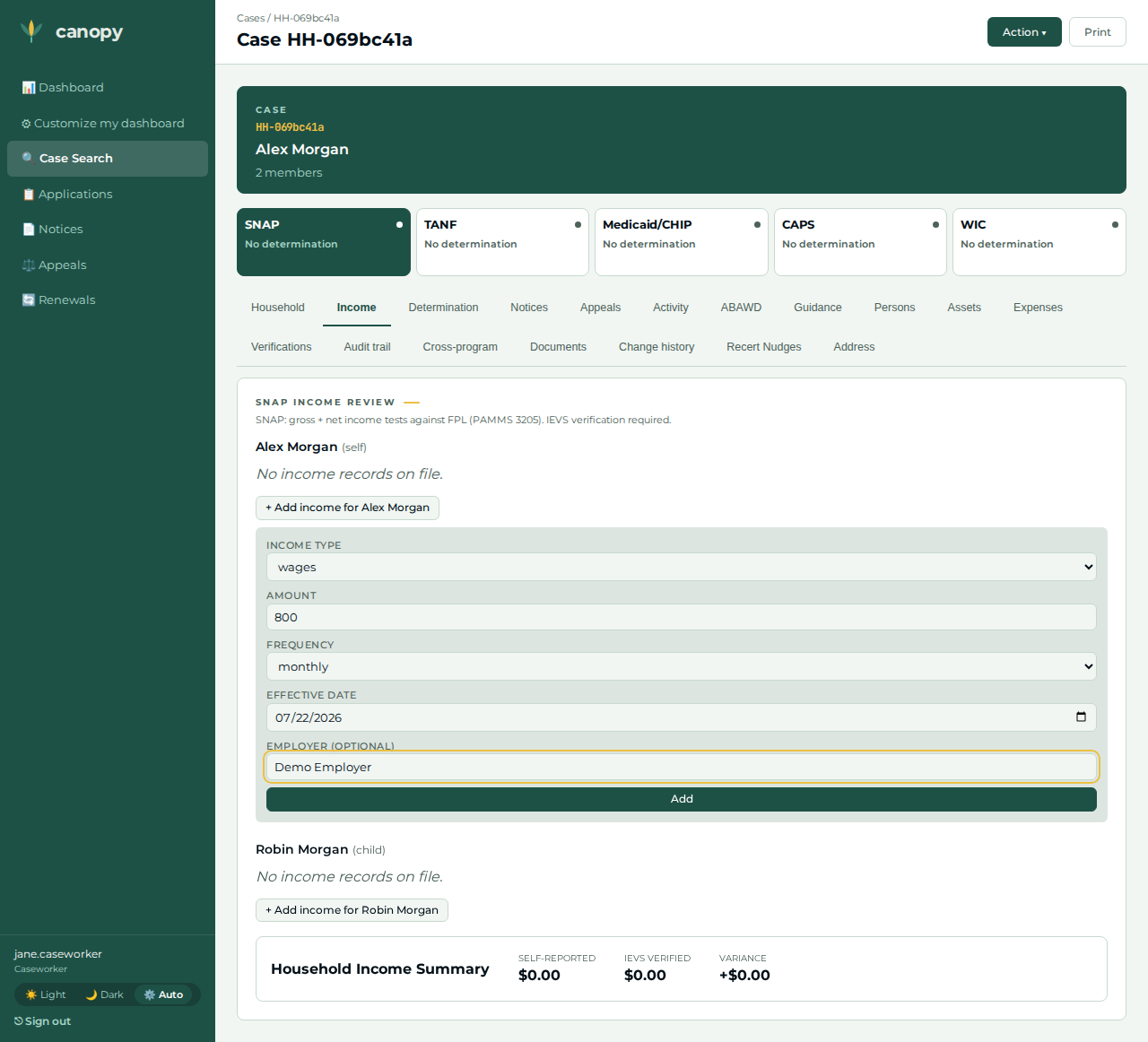
Caseworker records the dollars the portal never captured — the head’s wages of $800/month (income type wages, frequency monthly, employer Demo Employer, effective today). Head-$800 + one child determines Approved with a positive net monthly benefit — the dollar issued as the continued benefit and later clawed back.
-
Caseworker records the head’s mailing address — 100 Peachtree St NW, Atlanta, GA 30303, type mailing, effective today. A portal-filed application drops the applicant’s apply address at finalize (#1137), and the notices recipient gate refuses a head with no usable postal address — without this fact no notice in the journey (the termination NOA, the 273.18 demand) can ever land.
-
Enrollment window — first of two months ago → first of twelve months ahead. Auto-enroll usually opens the enrollment from the approval event first, so the manual create may legitimately hit the one-live-enrollment fence (#1130) — either outcome leaves the live enrollment the termination needs.
-
Clock choreography (all through
/test/clock, no hand-typed past dates): the contested arc — schedule the termination, file the action-bound appeal, issue the contested month — runs two days into the next logical month (the election date); the decision is recorded after a further 35 logical days, past the P2 cessation, with the ALJ-signed and agency-received dates (#1099) both set to the election date. The hearing decision is Upheld — agency action sustained.
The walkthrough, step by step
| # | Screen | Action | Expected | Screenshot |
|---|---|---|---|---|
01 |
Applicant |
At |
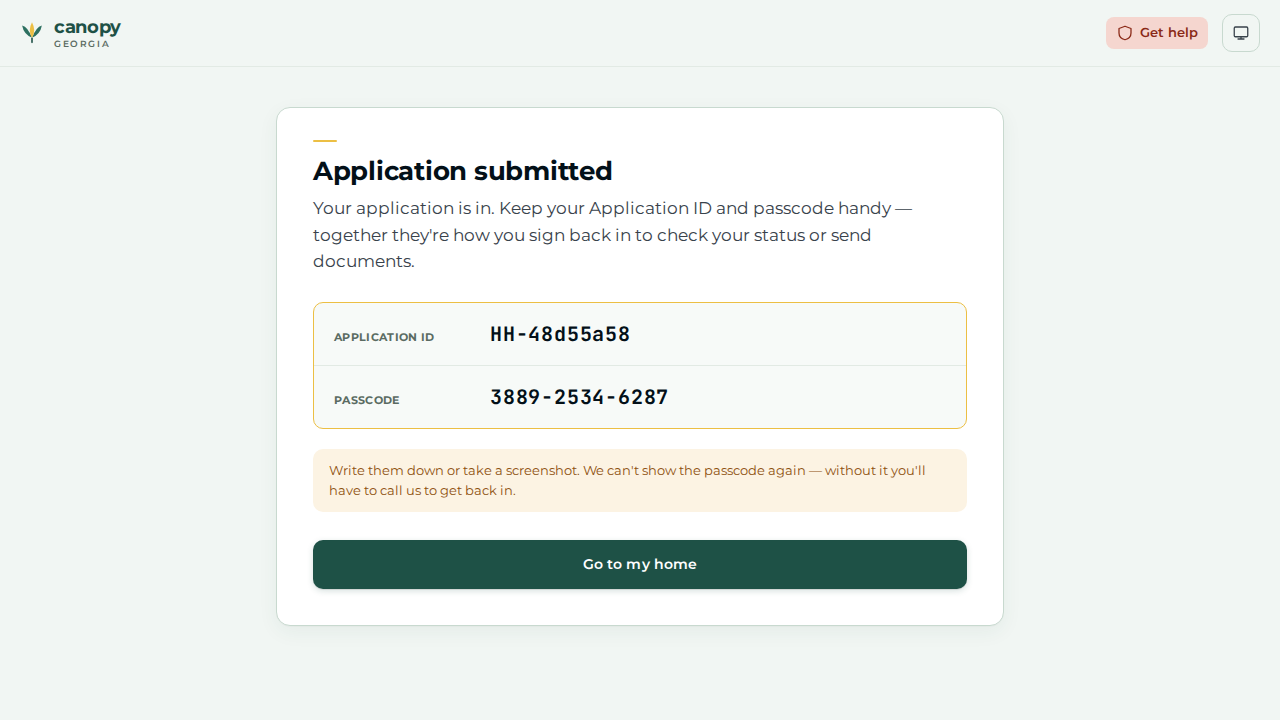
The Application submitted screen reveals the |
|
02 |
Caseworker |
Open the portal-filed case ( |
The wages row is recorded — the dollars the portal never captured. |
|
03 |
Caseworker |
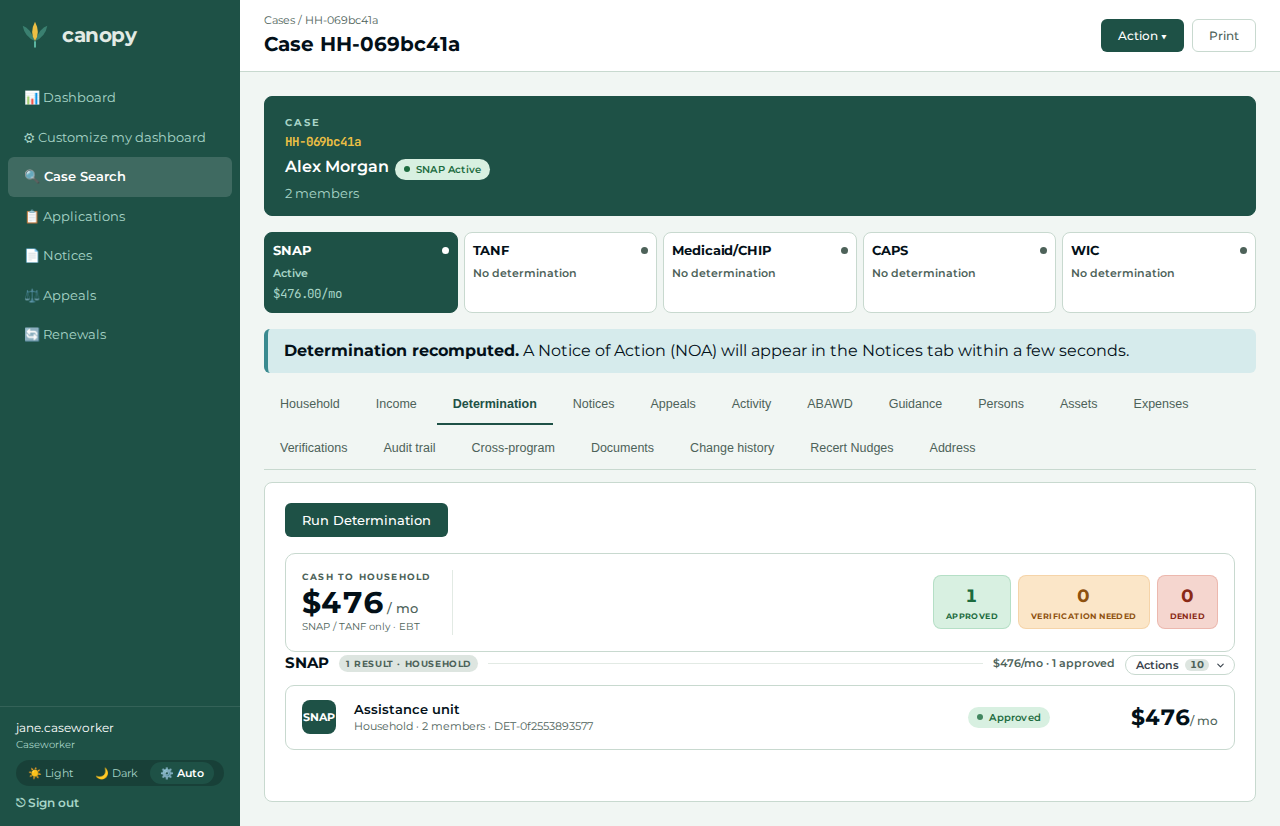
On the Determination tab, open the Action ▾ menu → Run Determination. |
SNAP determines Approved with a positive net monthly benefit — the journey’s starting point. |
|
04 |
Caseworker |
Open the Address section → + Add address for the head → type mailing, 100 Peachtree St NW, Atlanta, GA 30303, effective today → Add. |
The mailing address is recorded. The portal-filed case dropped the apply address at finalize (#1137); without this fact the notices recipient gate blocks every notice below in the work queue. |
(no screenshot — not captured by the paired spec) |
05 |
Caseworker |
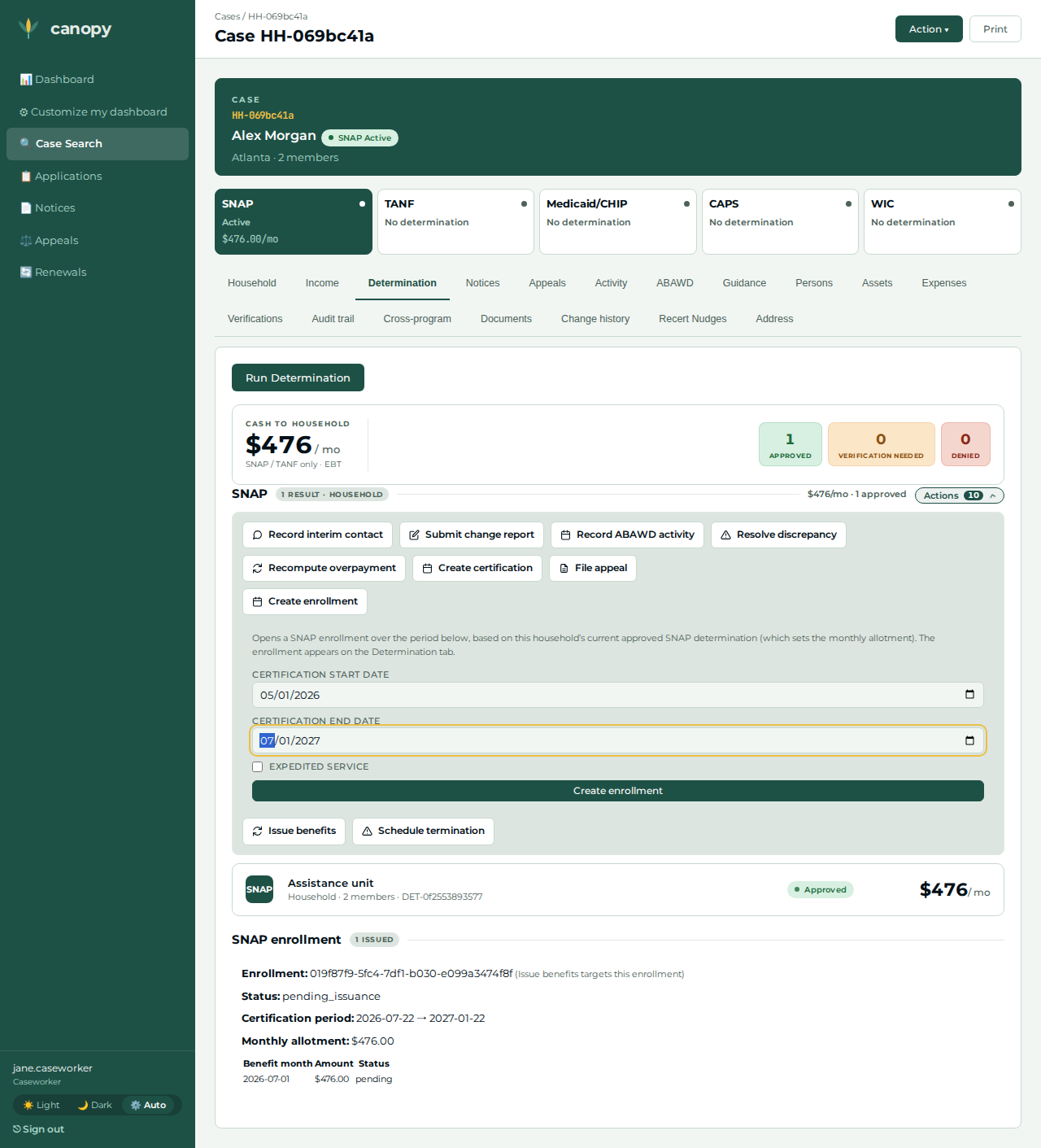
Determination tab → Actions panel → Create enrollment; enter the certification period → Create enrollment. |
Either the enrollment is created, or the one-live-enrollment conflict reports that auto-enroll already opened it from the approval event (#1130) — both outcomes leave the LIVE enrollment the termination needs (#976/#1130). |
|
06 |
Fleet clocks |
Advance every service’s logical clock to two days into the next month ( |
Every service’s legal "today" is now the election date, inside the contested month; the same-day filing below is therefore always timely. |
(no screenshot — a control-surface call, not a screen) |
07 |
Caseworker |
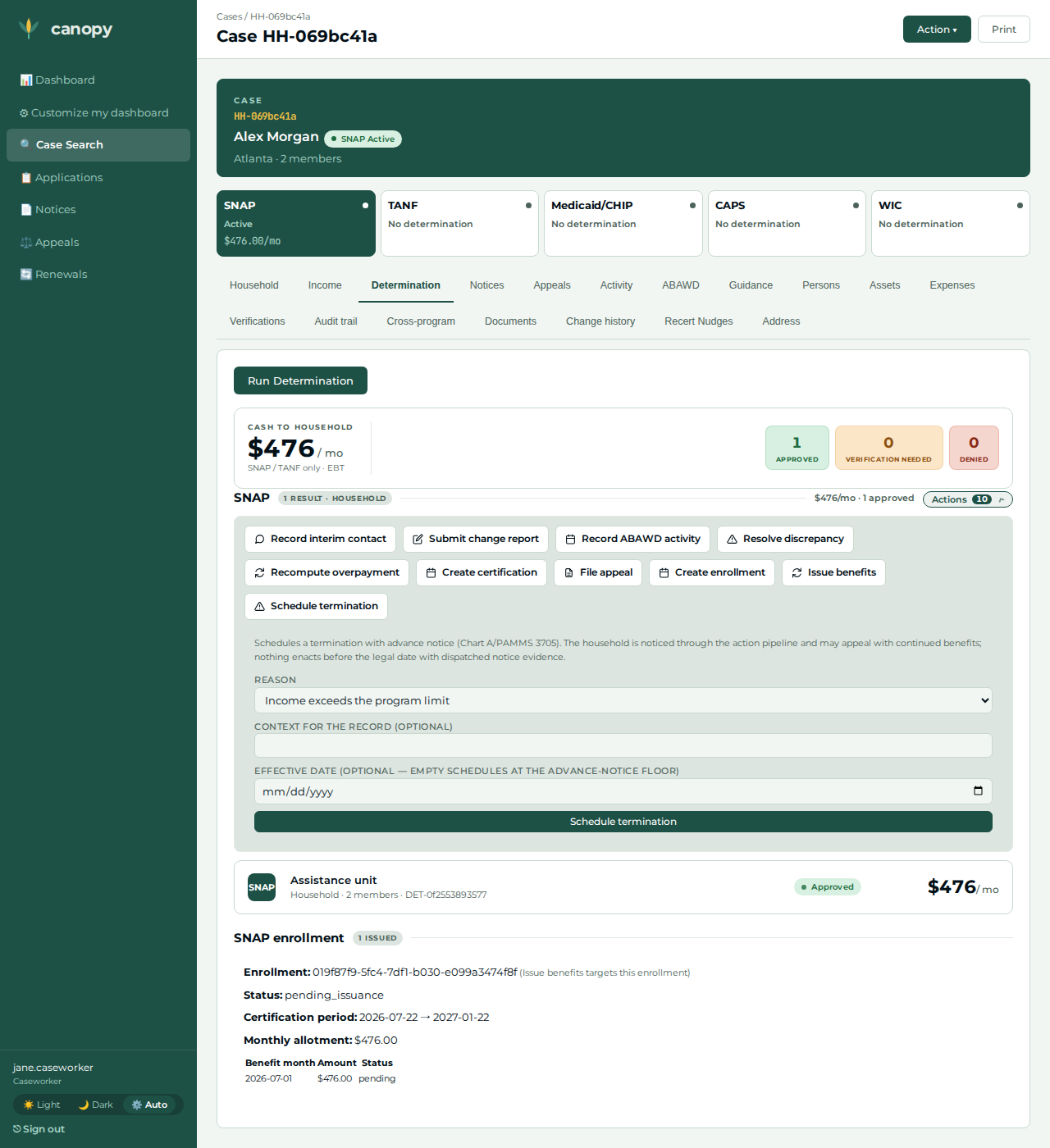
Determination tab → Actions panel → Schedule termination; pick reason income exceeds limit → Schedule termination. |
The scheduled-action card appears — the real adverse action the appeal binds to (#1103). A standard (non-exempt) termination is continued-benefits-electable per P4. |
|
08 |
Caseworker |
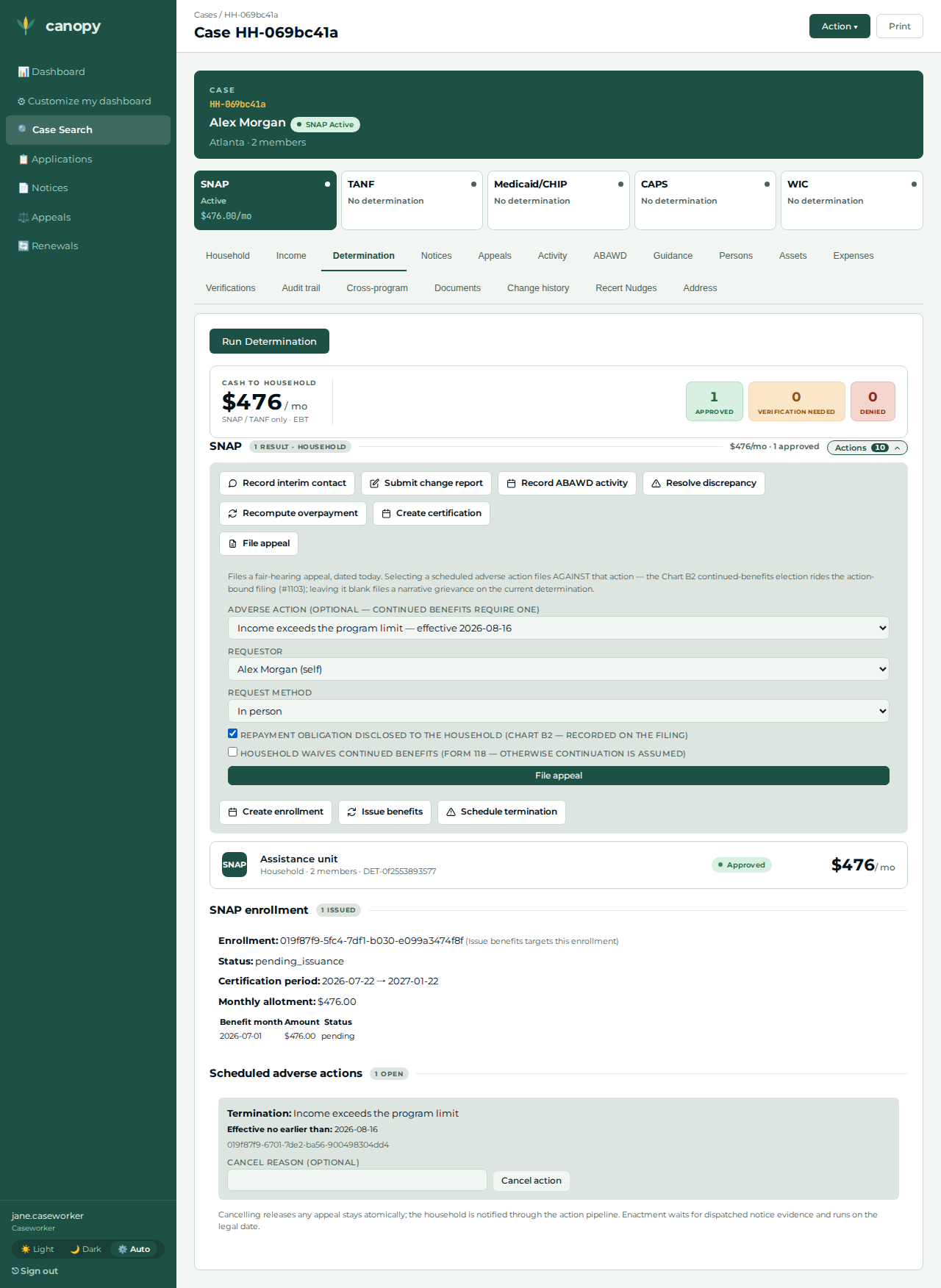
Actions panel → File appeal; pick the requestor (the head), select the scheduled termination as the contested adverse action, and check the repayment-obligation disclosed attestation → File appeal. |
Redirects to the Appeals tab. The Chart B2 continued-benefits election rides the action binding — the synchronous fenced stay lands before the grant commits (#1098/#1103). Filed the same logical day the action was scheduled, so the 14-day election window is always satisfied. |
|
09 |
Caseworker |
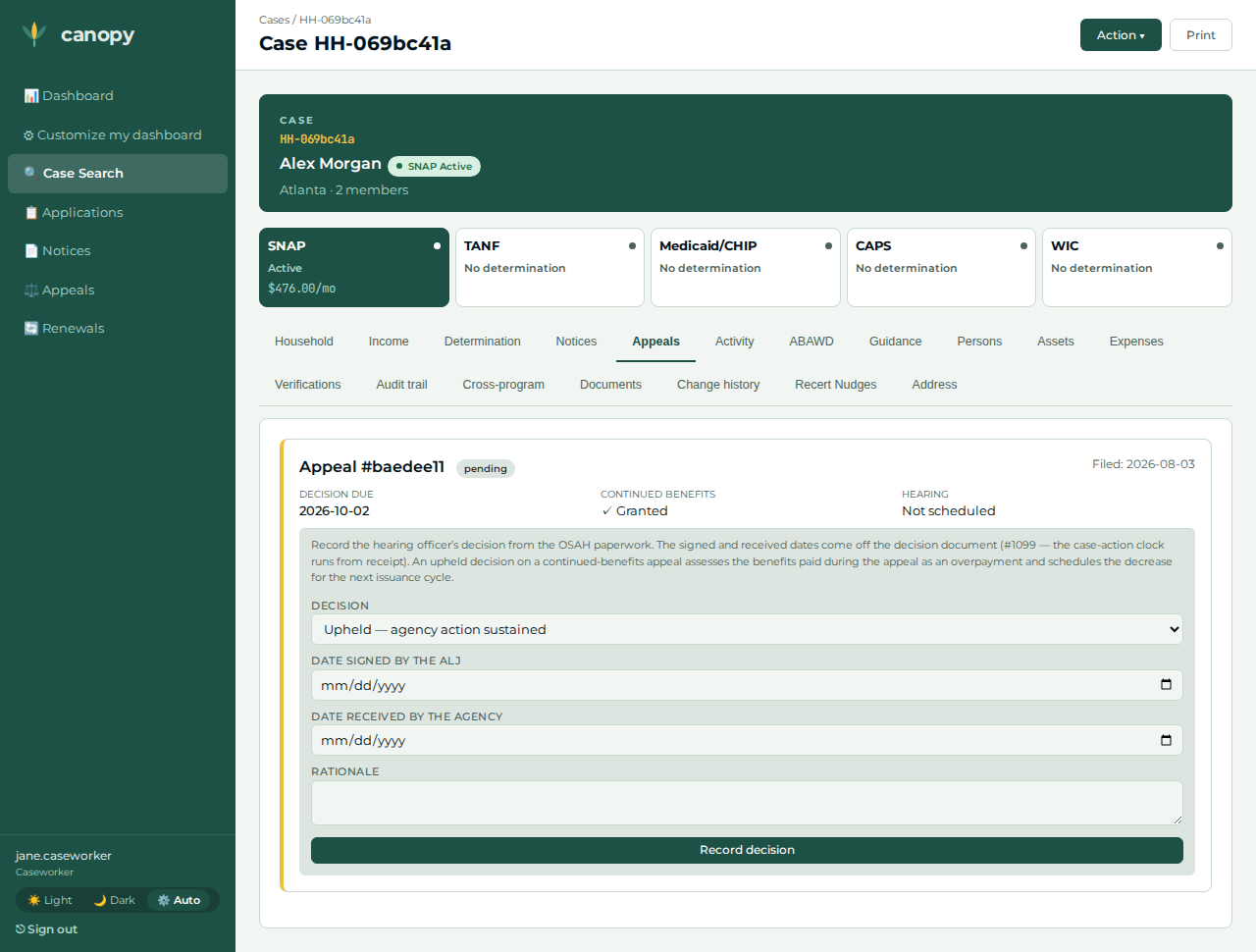
Open the Appeals tab. |
The appeal is pending with Continued Benefits ✓ Granted. |
|
10 |
Caseworker |
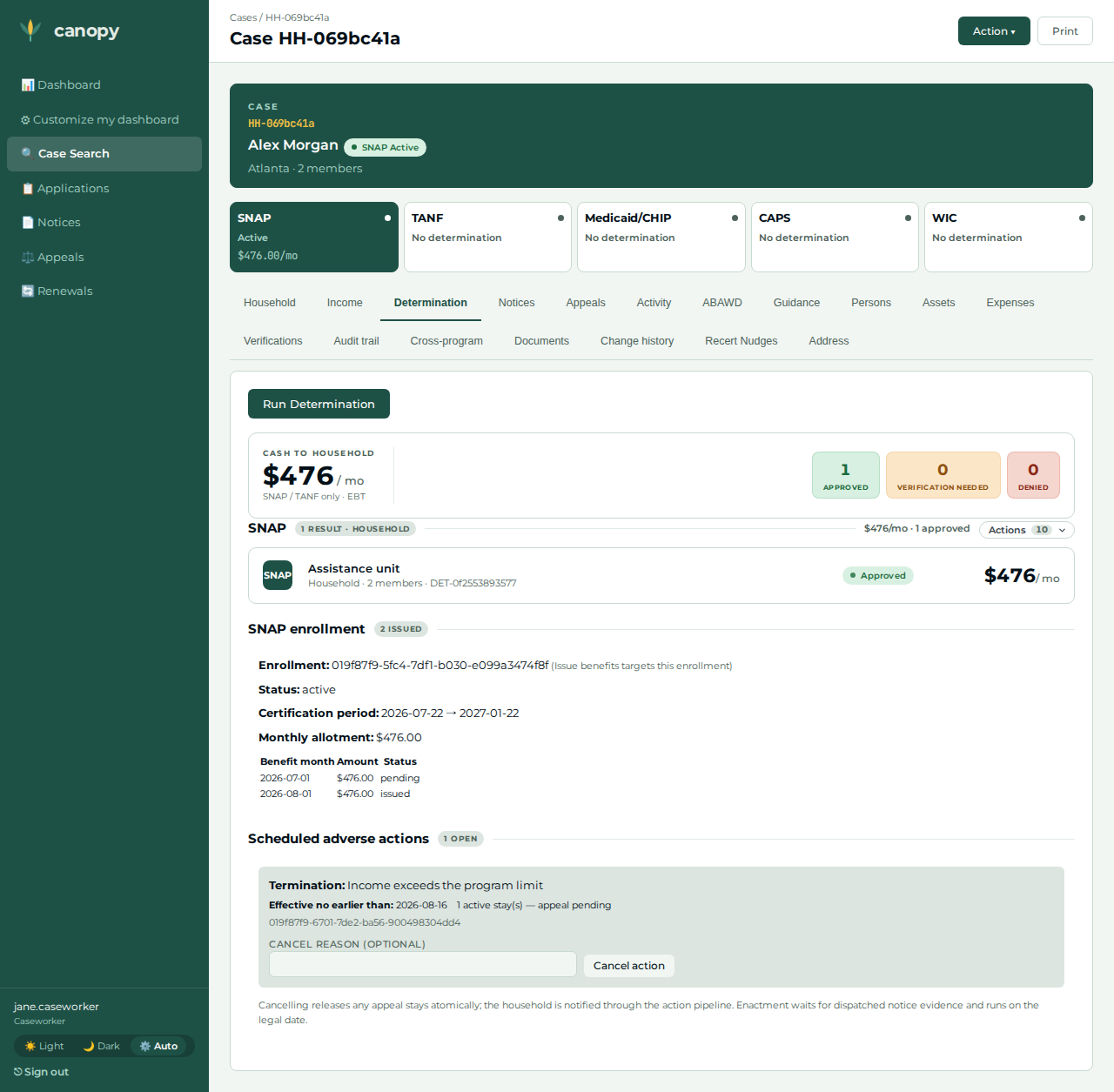
Actions → Issue benefits for the contested month (the current logical month). |
The issued benefit month lists — the continued benefit paid pending the hearing, issued only because the stay holds. It is the only issuance the continued-benefits window can reach, and the whole eventual claim. |
|
11 |
Fleet clocks |
Advance the logical clocks a further 35 days — past the P2 cessation (the next issuance cycle after the decision is received). |
The continued-benefits window is closed, so the async assessment worker can assess within seconds instead of deferring until next month. |
(no screenshot — a control-surface call, not a screen) |
12 |
Caseworker |
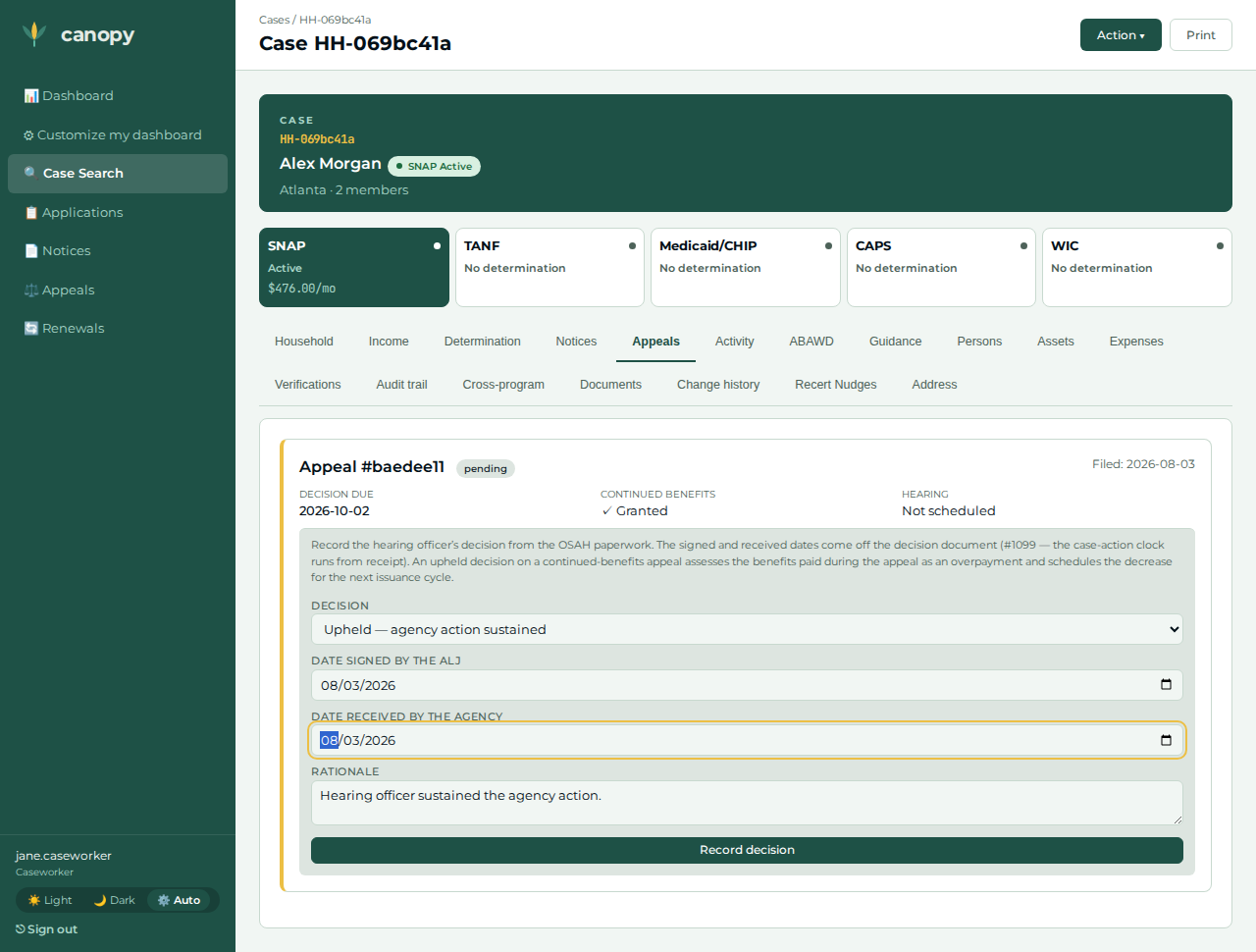
On the pending appeal, Record decision → Upheld — agency action sustained; enter the rationale and the ALJ-signed + agency-received dates (#1099 — both the election date) → submit. |
The decision is recorded; the appeal flips to decided immediately. The overpayment assessment is ASYNC (#1105). |
|
13 |
Caseworker |
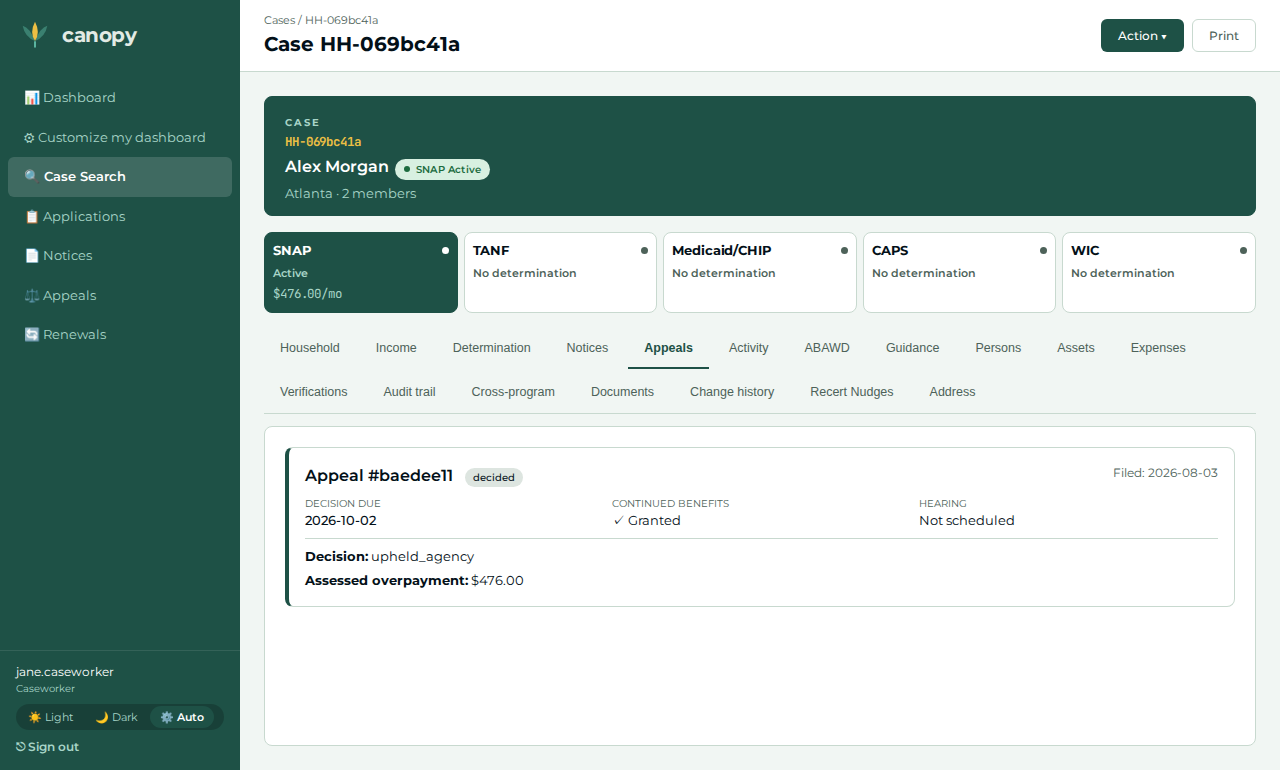
Wait for the async assessment to commit (#1105 — the worker may defer once and retry on its 60 s backoff), then reload the Appeals tab. |
The appeal reads back decided with the Assessed overpayment — the human-visible consequence. |
|
14 |
Caseworker |
Open the Notices tab (poll — the claim’s event fans out asynchronously). |
The 7 CFR 273.18 overpayment demand notice row appears: the auto-opened claim stages |
(no screenshot — asserted by identity in the paired spec, not captured) |
15 |
Applicant |
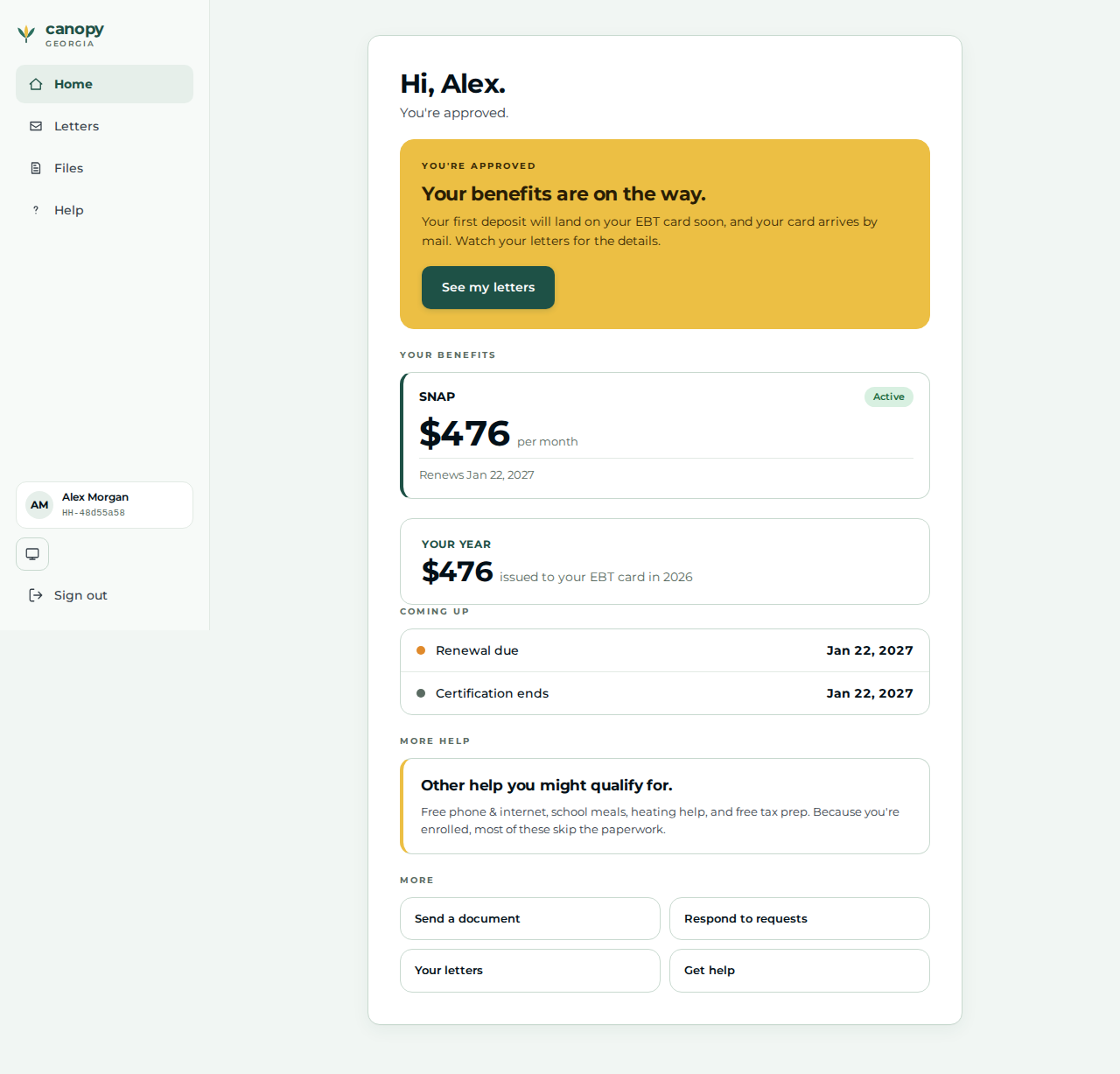
Sign back in at |
The approved Home greeting renders — the applicant sees their case is live. |
|
16 |
Applicant |
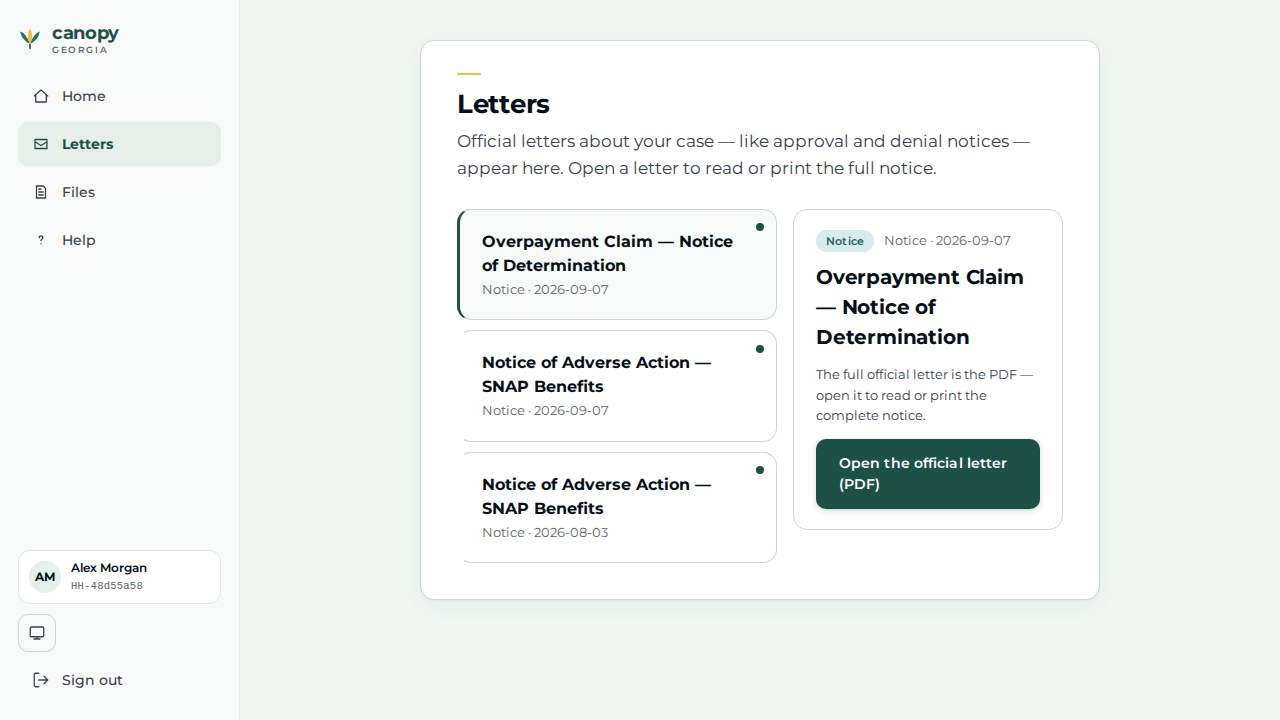
Open Letters. |
The applicant’s Letters surface. The 273.18 demand notice is a worker-tab artifact (step 14); whether it is also delivered applicant-side is out of scope for #994, so no letter is asserted here — the visit closes the portal→worker→portal loop. |
|
Expected outcome / oracle
The correctness oracle is a relational triple equality, so it holds under any
jurisdiction’s allotments (no policy dollar is asserted): the appeal’s assessed
overpayment, the summed issued benefits (the same issued && !retained windowed
set the appeals service reads — here the contested month alone), and the
auto-opened SNAP claim amount are all equal and all positive. Alongside it:
-
UI read-back. The appeal shows continued benefits granted while pending, then flips to decided with the assessed overpayment after the upheld decision (the assessment is asynchronous, #1105 — the page is reloaded after the service reports it).
-
Cross-service async (claim). The SNAP claim is opened by an event subscriber, so it is polled until it appears, then asserted to carry the
continued_benefits_on_appealmarker. -
Cross-service async (demand notice). The claim stages
snap.overpayment_claimed, so the 7 CFR 273.18 demand notice is polled on the worker Notices tab and matched by identity (the row contains "Overpayment"), so an unrelated notice cannot false-pass — the appeal→claim path is no longer notice-silent (#994).
Honest scope
-
The calendar is logical, not real. The contested arc requires the test-clock devstack build: the fleet’s per-service clocks are advanced two days into the next month for the election and a further 35 days past the P2 cessation before the decision — through the
/test/clockcontrol surface that exists only in that build. No past or future date is typed into any form (backdating died with #1098); the signed/received decision dates (#1099) are the real election date. -
The enrollment beat is "ensure", not "create". Auto-enroll usually opens the enrollment from the approval event moments before the worker’s manual create, so the create legitimately hits the one-live-enrollment fence (#1130) — either outcome satisfies the precondition, and the walkthrough treats both as success.
-
Auto-enroll’s first issuance stays
pendingforever on the devstack (no EBT drive on the subscriber path, #1138); the next-month window construction exists precisely to keep that stuck row pre-window, where the assessment worker’s pending fence cannot see it. -
The portal captures composition + income categories only — never amounts. So the applicant answers "no one works right now" at
/apply, and the caseworker records the actual $800/month wages on the worker Income tab. This is the honest portal→worker division of labour, not a discrepancy: the determination reads the worker-authored wage fact. -
The mailing-address beat is a repair, not colour. A portal-filed application drops the applicant’s apply address at finalize (#1137), and the notices recipient gate refuses a head with no usable postal address — the worker records it so the termination NOA and the 273.18 demand notice can land at all.
-
The applicant’s
/lettersis not asserted on the demand notice. The 273.18 demand notice is asserted on the worker Notices tab; whether it is also delivered applicant-side is out of scope for #994. The applicant view-back proves the portal→worker→portal round-trip (a real re-login to an approved Home).
Verifying the journey
cargo xtask e2e --devstack-profile full -- \
  specs/journey-snap-upheld-decision-overpayment.spec.ts --project journey
The devstack must be a test-clock feature build
(CANOPY_CARGO_FEATURES=canopy-api/test-clock) — the spec skips gracefully
otherwise. It files a SNAP application (head + one child) through the real served
applicant portal on a separate unauthenticated context, then drives the full arc
through the worker portal — recording the head’s wages + mailing address, running
the determination, ensuring the live enrollment, and (under advanced logical
clocks) scheduling the termination, filing the action-bound appeal with the
Chart B2 election, issuing the contested month under the stay, and recording the
upheld decision with the #1099 signed/received dates — then polls the async
assessment, the auto-opened claim, and the 273.18 demand notice, before the
applicant signs back in to view their approved Home. It captures the step
screenshots (worker step-NN-…, applicant app-NN-…) into
test-results/e2e/walkthroughs/… for commit into
docs/modules/ROOT/assets/images/walkthroughs/….